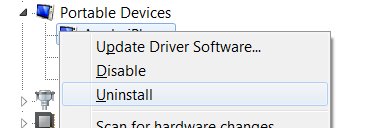
right-click on Portable Devices and choose Scan for hardware changes
This will reset the name to Apple iPhone
If you want to manually set the name to something specific
Type regedit into your search bar and open registry editor.
Go to the the very top and select edit and find.
Type in the whole name that is wrong aka “Wrong iPhone” and hit find.
After it searches your registry and finds the key double click it and edit the name.
There are multiple keys with this same name so use F3 to find each progressive entry in the registry and until you have replaced every name. After this is done, you should close regedit and unplug then plug your iPhone back in
 11/30 Barcoo St, Roseville, NSW, 2069